Network test
The network test measures raw TCP speed between the PC and the Xbox’s memory, with no disk involved. Use it to check what your network adapter and driver can do before blaming the disk or the FTP client.
- On the Network tab, press A. The Xbox listens on port 36020.
- On the PC, run
FastFTP360-PC.exeand enter the Xbox IP. - Pick a direction, duration and number of streams, then start the test.
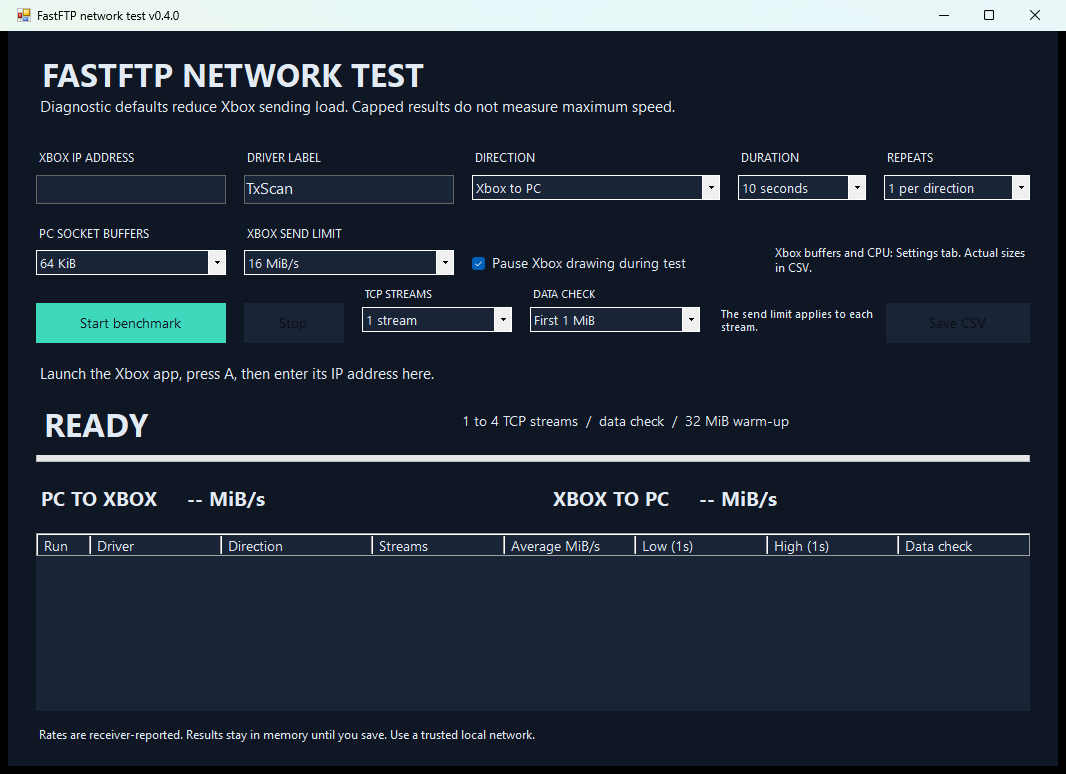
The PC app can run 1, 2 or 4 TCP streams, check every byte (All data), limit the Xbox’s send rate, and save results to CSV. Each stream first checks 1 MiB of known data and warms up with 32 MiB, then runs the timed transfer. The receiver reports the final rate. Use the PC app from the same release as the XEX. Versions with a different protocol are rejected.
The Xbox send limit applies per stream. While data moves, the Xbox holds a still screen by default and the PC shows live progress. B still stops the test.
The Xbox socket buffers, the worker CPU for the test’s streams, and drawing during transfers are on the Settings tab. The test’s wire format is described in docs/PROTOCOL.md on GitHub.