The server in detail
What NetDisc360.exe does, all from one file:
- Serves your games to the NetISO plugin over the NetISO protocol (TCP port 4323), like
netiso-srv. New and removed games are picked up without a restart. - Keeps
Hdd1:\NetISOcurrent over Aurora’s FTP. A new game gets its folder once its file has stopped changing for 10 s, named after the game without region, language and revision tags (Banjo-Kazooie - Nuts & Bolts (USA) (En,Ja,Fr,De,Es,It).isobecomesBanjo-Kazooie - Nuts & Bolts; tags like(Disc 2)stay). A removed game loses its folder, and launchers from an older build are replaced. Only folders that hold nothing but the launcher’s own files are ever removed, and nothing is removed when the server has no games. - Asks Aurora to scan after adding or removing games (
SITE INITIATESCAN, a command of Aurora’s FTP server), so new games show up at once with their art. - Puts the games in Aurora’s Xbox 360 category (see below).
- Serves each game once. A game that is there more than once (the same Title ID and disc, as an ISO, a folder or a package) is a conflict: the dashboard shows a notice and a badge on Games, the activity list says so, and on Windows the icon shows a notification. The Games page lists every copy with its path; Play this one picks the copy to serve, and the choice is kept in the settings file. Until you choose, an ISO is served before a GOD package before a folder. A copy that turns up later, or the chosen copy going, asks again.
- Serves several consoles at once. Each console plays its own game, and each one’s
Hdd1:\NetISOis kept current on its own: one console being off doesn’t hold up another.
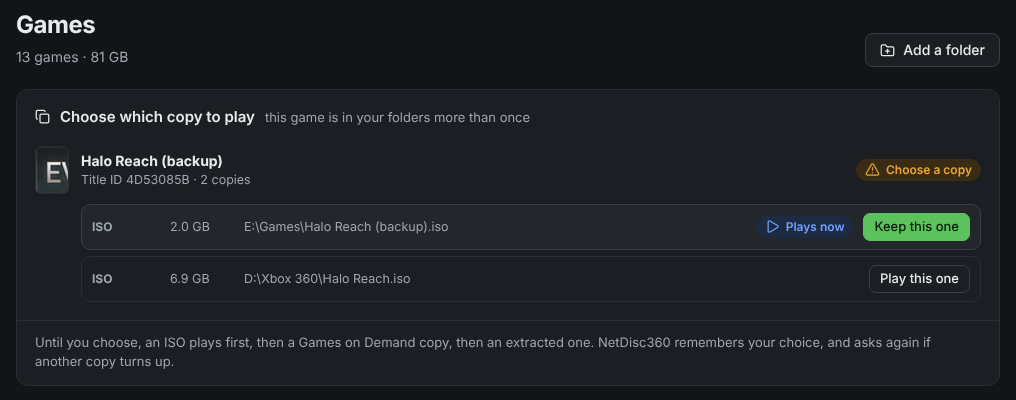
A game that’s in your folders twice: pick the copy to play on the Games page.
Options
Section titled “Options”| Option | Default | |
|---|---|---|
<folder> ... |
the current folder | Folders with your games. |
--config <file> |
Keep the settings in this file. What’s saved there (the dashboard’s changes) wins over these options. The Windows app uses %APPDATA%\NetDisc360\netdisc.ini, the Docker image /config/netdisc.ini. |
|
--web-port <n> |
8360 | The dashboard’s port. 0: no dashboard. |
--web-bind <address> |
127.0.0.1 | Where the dashboard listens: 127.0.0.1 for this computer only, 0.0.0.0 for the network too (the Docker image’s default). Set a password for it on the dashboard or with NETDISC_WEB_PASSWORD. |
--xbox <address> |
every console that connects | Keep only this console’s game folders up to date. Give it once for each console. |
--ftp-user, --ftp-password |
xboxftp |
Aurora’s FTP login. |
--xbox-folder <path> |
/Hdd1/NetISO |
The game folder on the console, as an FTP path. |
--aurora <path> |
/Hdd1/Apps/Aurora |
Aurora’s folder, for the Xbox 360 category. |
--no-push |
Only serve games; leave the console alone. | |
--no-category |
Leave Aurora’s Xbox 360 category alone. | |
--no-scan |
Don’t ask Aurora to scan after adding or removing games. | |
--online-wait <s> |
120 | After Aurora’s FTP comes back, the longest wait for the console to come online before writing game folders (see Cover art). |
--ping <s> |
30 | How often each console is pinged (a connection attempt to its FTP port; the Xbox answers no ordinary ping) to see that it’s still on; 0: never. A console that answered before and stops (and whose connection ends) shows as Offline. |
--remove-wait <s> |
60 | How long after the server starts (or its game folders change on the dashboard) a game folder whose game is gone stays on the console, so a games folder or drive that isn’t there yet (or isn’t added on the dashboard yet) doesn’t drop its games from Aurora. |
--port, --ftp-port |
4323, 21 | |
-v |
Log every request. |
-r and -b from netiso-srv are accepted and ignored. NetDisc360.exe --help lists every option. In Docker, the same settings are environment variables.
Cover art
Section titled “Cover art”Aurora looks a game up online (name and art) only once, when its scan first finds it, and a game it finds while the console is still coming online keeps its folder name and gets no art. Aurora’s FTP server answers a minute or two before the console can reach out after a boot, so when Aurora’s FTP comes back the server writes new game folders once the console has connected to it (the NetISO plugin does that as soon as it can), or after 2 minutes at most (--online-wait). After a game played over NetISO there is no wait. A game that has no art anyway can be refreshed in Aurora, or its folder in Hdd1:\NetISO renamed: at the next scan Aurora drops the old entry and looks the game up again. The server keeps a renamed folder, since it matches folders to games by their netiso.ini.
Aurora’s Xbox 360 category
Section titled “Aurora’s Xbox 360 category”Aurora files the launchers under Unsigned, because they aren’t retail-signed, so its Xbox 360 category doesn’t show them. The server edits Media\Scripts\Content\FilterFunctions.lua in Aurora’s folder once, so that the category also lists games in the NetISO folder, and keeps the original next to it as FilterFunctions.lua.before-netiso. If an Aurora update puts the original back, the server makes the same edit again. A filter it doesn’t recognise is left alone, and --no-category turns this off.
Extracted games and Games on Demand
Section titled “Extracted games and Games on Demand”Besides ISOs, the server serves Xbox 360 games extracted to a folder (default.xex at the top) and Games on Demand packages (<Title ID>\00007000\<package> with its .data folder). Nothing is converted or written next to them: the NetISO plugin only reads a disc as sectors, so the server answers with the disc image the folder or package came from, put together as it’s read.
- A folder is listed as
<folder name>.iso, a package as<game folder>.iso(or the package’s own title when it isn’t in a folder of its own). ADisc 2folder with its owndefault.xexinside a game’s folder is a disc of its own,<game> - Disc 2.iso. A name that is already taken gets a number. - An extracted game is a GDF (XDVDFS) disc built in memory when it’s mounted. A disc can’t hold a file of 4 GB or more.
- A GOD package is the disc’s game partition cut into
Data0000,Data0001, … with hash blocks between; reads skip them. - A folder given on the command line is never taken as a game itself, even with a
default.xexat its top; only what is inside it counts.
Install discs
Section titled “Install discs”Some games come on two discs, one of which only installs content: GTA V’s second disc (8.3 GB in 4 packages) and Forza Motorsport 4’s (car packs). The server reads the packages each disc carries for its game (content\0000000000000000\<Title ID>\ on an extracted folder, ISO or GOD package) and writes install.ini into the game folder of each other disc of that game, naming the install disc and its packages. Before such a game starts, the launcher looks for each package under Content on the hard drive (and USB storage set up for the console) at its full size, and offers to start the install disc if one is missing. A disc you swap to during a game, such as Red Dead Redemption’s second disc, carries no packages and gets no install.ini.