NetUsb360
Use a USB Ethernet adapter as the network connection on a homebrew Xbox 360. A faster fork of CUsbEnet by proferabg. See what this fork changes.
NetUsb360 is a driver plugin. Once it is loaded, a supported USB Ethernet adapter works like the console’s own network port: Aurora, FTP servers, games and other apps use it without any changes.
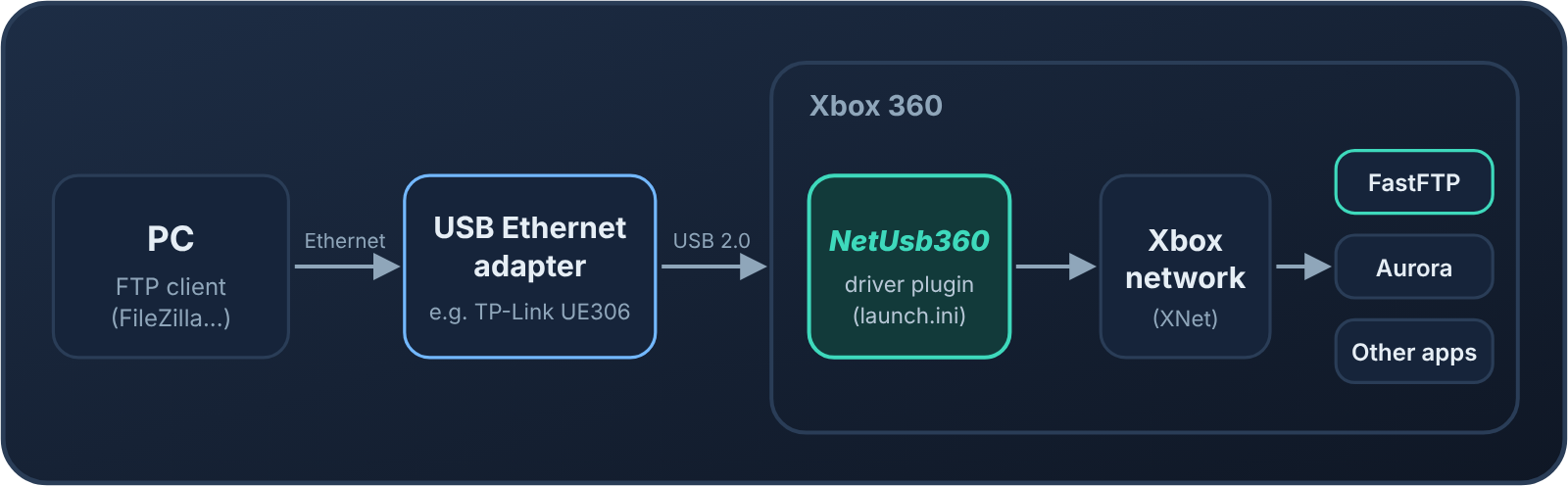
Version 1.1 is tuned for speed. Together with FastFTP, it is the fastest way we know of to copy files to an Xbox 360 over FTP: about 28 MiB/s measured on uploads, against about 19.5 MiB/s with Aurora’s built-in FTP over the same adapter and about 10.5 MiB/s with normal FTP over the console’s own 100 Mbit port.
- FTP upload with FastFTP
- about 28 MiB/s
- Aurora's built-in FTP, same adapter
- about 19.5 MiB/s
- Normal FTP, console's own 100 Mbit port
- about 10.5 MiB/s
- Dashboard/kernel
- 17559
What's new in version 1.1.2
Original Xbox games now work over the USB adapter.
Original Xbox games can now use the USB network adapter. These are games that run in the Xbox 360's original Xbox emulator, such as Halo: Combat Evolved streamed from a PC with NetDisc360. With 1.1.1 and older, two things went wrong. Either the console froze as soon as such a game started, or DashLaunch kept showing "Fatal Crash Intercepted!" and the game stopped getting data.
What changed
- Sent packets are handed back the way the console's own network port does it: a moment later, not inside the send call itself. The emulator's network layer hung on the old way.
- The small pieces of code the driver uses to call the console's own network functions now sit in memory that may run code. While the emulator runs, the console refuses to run code from data memory.
Upload speed is unchanged. Same test, same evening, 1 GiB uploaded to FastFTP360 with the acksmall build: 25.7 MiB/s with 1.1.1, and 26.3 and 23.7 MiB/s in two runs with 1.1.2. Through Aurora's own FTP the numbers were 11.7 and 12.8 MiB/s.
New file names
The files are now called NetUsb360.xex and NetUsb360-acksmall.xex (in 1.1.1 they were UsbNet360.xex and UsbNet360-acksmall.xex). Coming from 1.1.1? Change the plugin1 line in launch.ini to the new name, or give the new file the old name.
| File | SHA-256 |
|---|---|
NetUsb360.xex |
195508cf56312cc93c13d0d3b8941952150f7800fd32367753c60e669ac7d164 |
NetUsb360-acksmall.xex |
c61132e12fbe3ddcfa6477b24bbe5692a5af6d7c0b8b116330921d7ec6c8e85c |
Both builds are for a retail kernel 17559. See Which file to use.
Tested
Tested on a retail 17559 console (ABadAvatar + XeUnshackle) with a TP-Link UE306 (AX88179), using the acksmall build:
- Halo: Combat Evolved streamed with NetDisc360: started from its Aurora tile, played, and returned to Aurora through Xbox Home, with no freeze and no crash.
- Normal Aurora use and FTP uploads worked as before.
The release acksmall build is the tested code: compared section by section before packing, it is identical to the test build except for a timestamp. The standard build has the same changes, without the experimental options.
Full change: #9
Quick start
Section titled “Quick start”You need an Xbox 360 that runs homebrew plugins (RGH/JTAG with DashLaunch, RGLoader, or a stock console with BadUpdate or ABadAvatar) on dashboard/kernel 17559, and a supported adapter.
-
Download
NetUsb360.xexfrom the Releases page (button above). See Which file to use if you want the faster experimental build. -
Copy it to the console, for example to
Hdd:\Plugins\NetUsb360.xex. -
Load it as the first plugin:
plugin1in DashLaunch’slaunch.ini, or the first plugin entry in RGLoader’srgloader.ini. See Install for the details. -
Plug the adapter into a USB port on the Xbox, connect it to your router or switch with a network cable, and restart the console.
-
Aurora, FastFTP and your other apps now use the adapter. The IP address they show comes from your router as usual.
Coming from CUsbEnet? Put NetUsb360.xex in its place in launch.ini, and don’t load both.