This guide covers the three Xbox 360 homebrew projects on this site: NetUsb360, NetDisc360 and FastFTP360. This page explains what each one does and what you need. The next pages install them on one console, one after the other, with example files you can download.
Each part also works on its own. Skip the projects you don’t need.
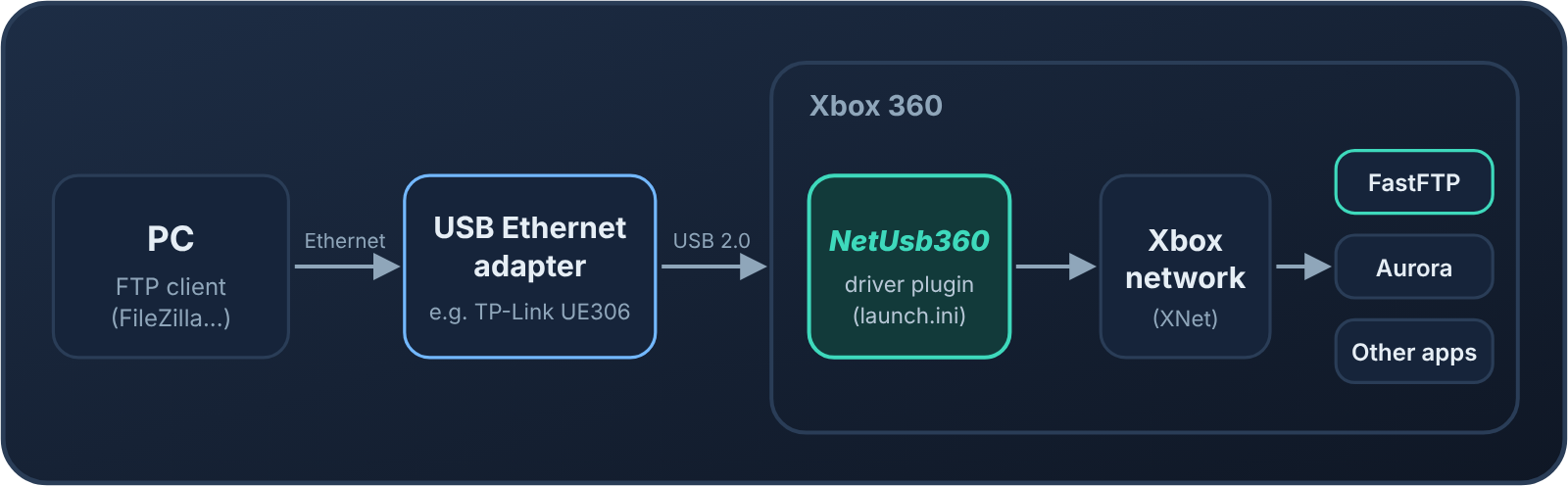
A driver plugin for the console. Once it is loaded, a supported USB Ethernet adapter works like the console’s own network port: Aurora, FTP servers, games and other apps use it without any changes.
Where it runs: on the console, as a plugin loaded at boot by DashLaunch or RGLoader.
When you want it: when the console’s own 100 Mbit/s network port is too slow for you. The other two projects get their speed from it.
A fast FTP server for the console, with built-in network and disk tests. It moves files between your PC and the Xbox’s internal drive or USB storage, using any regular FTP client such as FileZilla.
Where it runs: on the console, as an app you start from Aurora, XeXMenu or your usual launcher. It is not a plugin.
When you want it: when you copy games, saves or other files to and from the console.
The Xbox 360’s own network port is 100 Mbit/s. NetUsb360 lets the console use a USB Ethernet adapter instead. Aurora, FTP servers, games and other apps then use the adapter without any changes.
NetUsb360 and NetDisc360’s two console plugins load at boot. In this guide they all load from DashLaunch’s launch.ini, with NetUsb360 as the first plugin.
NetDisc360’s server on your PC or NAS gives Aurora a tile for each game over Aurora’s FTP, and streams the game disc to the Xbox over NetISO as you play.
FastFTP360 is an app you start from Aurora when you need it. NetDisc360 keeps using Aurora’s own FTP, which runs whenever Aurora is open.
None of them needs the others. FastFTP360 also works over the console’s built-in network port, and NetDisc360 lists NetUsb360 and FastFTP360 as optional. Together they are faster. Measured with a TP-Link UE306 adapter and NetUsb360:
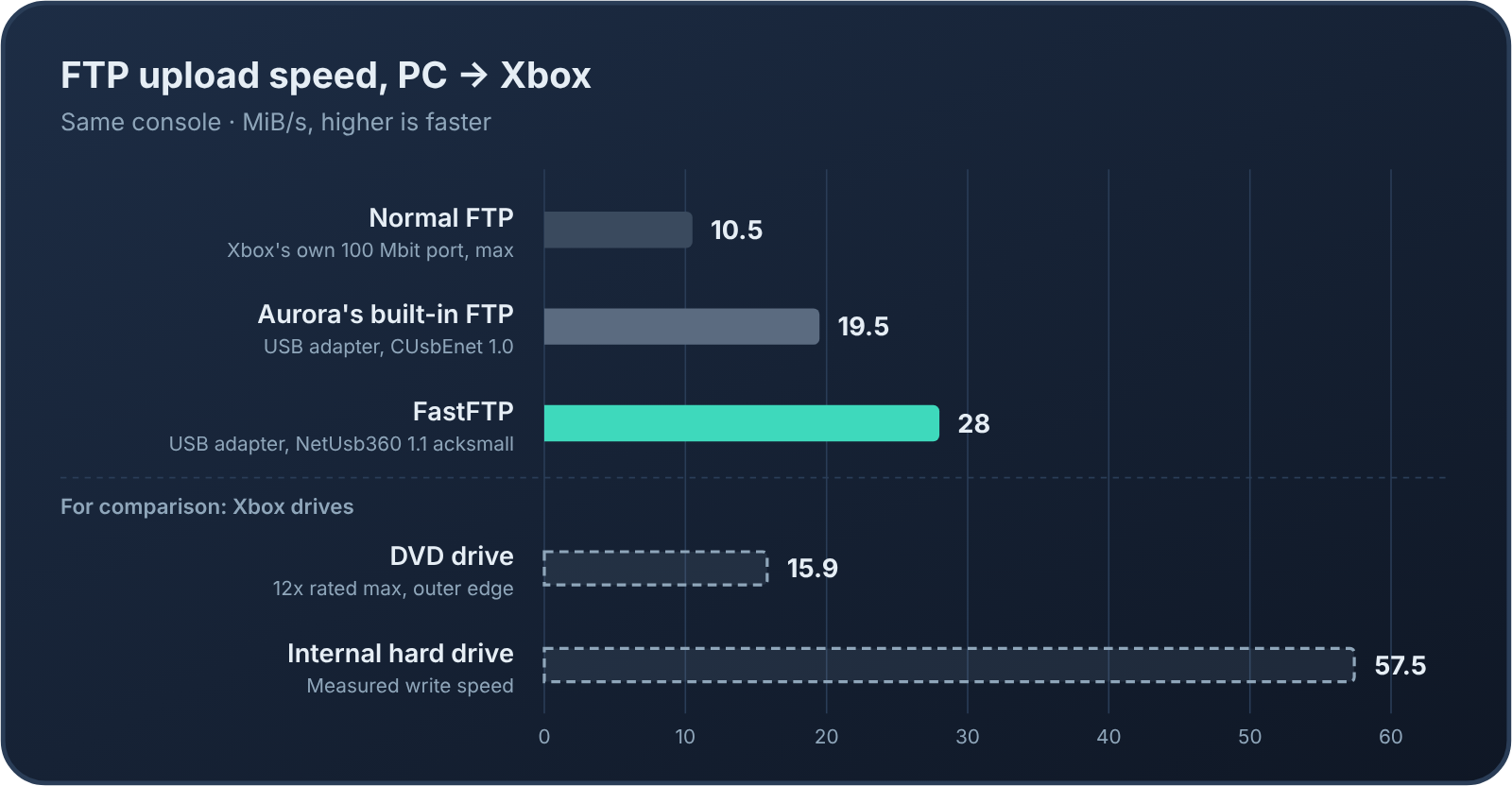
File copies: FTP uploads with FastFTP360 and NetUsb360’s acksmall build reached about 28 MiB/s, against at most about 10.5 MiB/s with normal FTP over the console’s own port.
Games: NetDisc360 games read at up to about 26 MB/s, where the console’s own network port stops at about 12 MB/s.
FastFTP360 writes to the disk while the transfer is still running, so it keeps up with what NetUsb360 delivers, and copies files faster than the console can read a disc. The internal hard drive writes at about 57.5 MiB/s, so it isn’t the limit: the Xbox’s USB 2.0 controller is. Speeds depend on your adapter, drive and network; each project page has the details.
A modded Xbox 360 on the same network as your PC. RGH and JTAG consoles work, and so do stock consoles with BadUpdate or ABadAvatar 1.3, with XeUnshackle or XeUnshackle-Max.
Aurora, the dashboard your games show up in (tested with 0.7b.2), and DashLaunch, which loads the plugins at boot.
The NetISO plugin, NetISO.xex 1.0 by cOz. NetDisc360 can’t work without it, and it isn’t included. You get it from ConsoleMods in the steps below.
A USB drive for the plugins: the one DashLaunch reads launch.ini from.
A Windows 10 or 11 PC, or Linux or a NAS with Docker.
Your games: ISOs, extracted game folders (with default.xex at the top) or Games on Demand packages.
1. Install NetUsb360Choose the adapter and the driver build, then load it as the first plugin.
2. Install NetDisc360Set up the console's plugins, start the server on your PC or NAS, and load games faster.
3. Install FastFTP360Start the FTP app, connect from your PC, and set your own login.
Example filesEvery file the guide uses: the lines to set in launch.ini, and NetISO.xex.txt, NetIsoTiles.ini, FastFTP360.ini and docker-compose.yml to download.